
How to Do an On-Page SEO Audit Yourself, And When to Hand It to a Professional Instead
An on-page SEO audit tells you why pages that should rank well don’t, and what’s stopping Google from sending you traffic you’ve already earned through good content or strong backlinks.
For a UK business owner, that translates directly into lost enquiries, missed sales, and wasted marketing spend. If you’re publishing content, paying for SEO work, or just frustrated that competitors with worse products outrank you, an on-page audit shows you exactly what’s broken and what to fix first.
You can absolutely run a useful audit yourself. You don’t need an agency for the foundational work, and this guide will walk you through the process step by step. But there’s a point where self-assessment hits its limit, and that’s worth understanding upfront so you don’t waste time on a half-measure.
What an On-Page SEO Audit Actually Covers
On-page SEO is everything on your website that affects how Google understands, ranks, and displays your pages. It’s separate from off-page factors like backlinks or domain authority.
A proper on-page audit examines:
- Title tags and meta descriptions are they optimised for click-through and keyword relevance?
- Heading structure, do H1s, H2s, and H3s follow a logical hierarchy that both users and search engines can follow?
- Content quality and keyword targeting does the copy match search intent, cover the topic comprehensively, and target the right terms?
- Internal linking are you connecting related pages in a way that distributes authority and helps users navigate?
- URL structure are URLs clean, descriptive, and keyword-friendly?
- Image optimisation are images compressed, properly named, and accompanied by alt text?
- Page speed and Core Web Vitals do pages load quickly and provide a good user experience?
- Mobile usability does the site work properly on mobile devices?
- Schema markup are you using structured data to help Google understand your content?
- Indexability and crawlability can Google actually access and index your important pages?
That’s a lot. But the good news is you can tackle most of it with free tools and a systematic approach.
The DIY On-Page SEO Audit: Step by Step
Here’s how to audit your own site without paying for expensive software or hiring an agency.
Step 1: Gather Your Tools (All Free)
You’ll need:
- Google Search Console, essential for understanding how Google sees your site
- Google Analytics, to see which pages get traffic and which don’t
- Google PageSpeed Insights, for Core Web Vitals and page speed analysis
- A spreadsheet, to track findings and prioritise fixes
Optional but helpful:
- Screaming Frog SEO Spider (free version, up to 500 URLs)
- Google’s Mobile-Friendly Test
Step 2: Identify Your Priority Pages
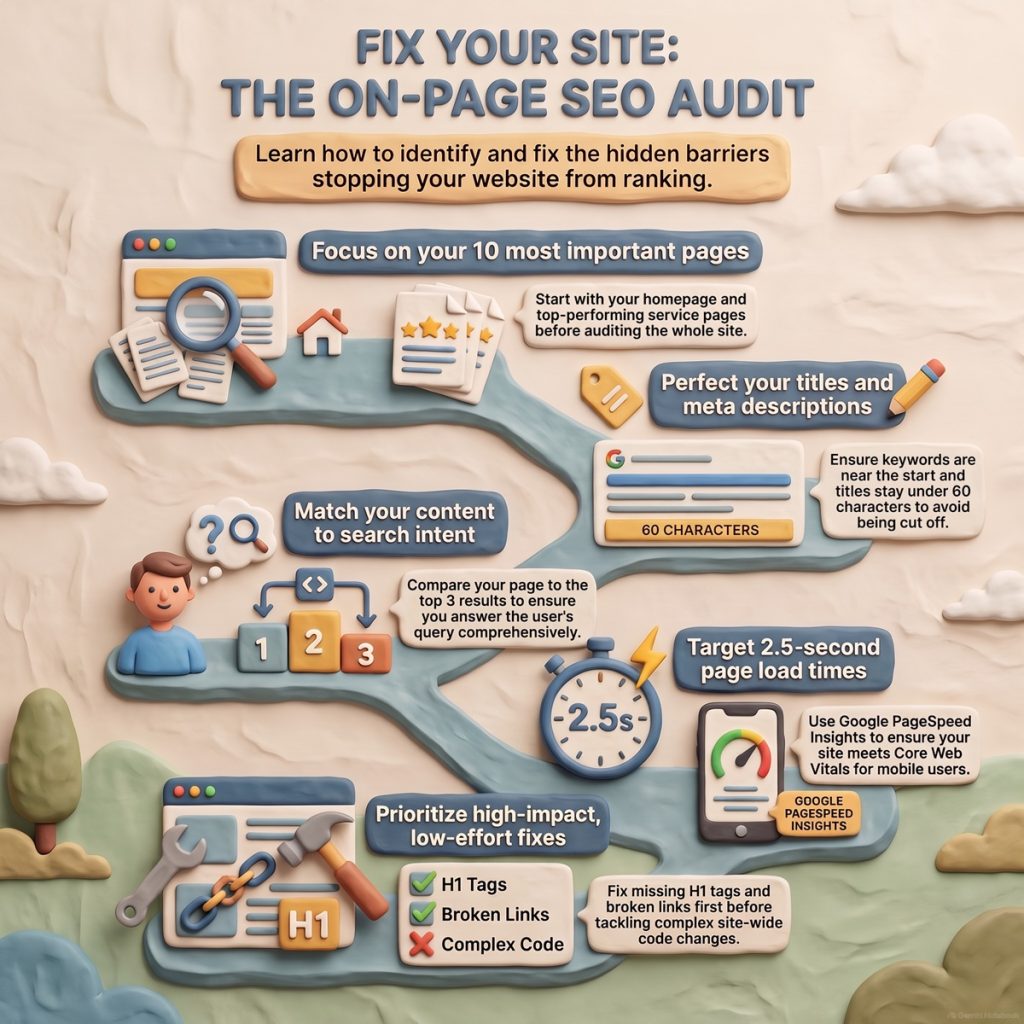
Don’t audit your entire site at once. Start with the 10-20 pages that matter most commercially:
- Your homepage
- Your main service or product pages
- Your top blog posts (by traffic, from Google Analytics)
- Key landing pages
- Pages that rank on page 2 of Google (positions 11-20), these are often one or two fixes away from meaningful traffic
If you’re a Manchester-based accountancy firm, that might be your homepage, your “accountants in Manchester” service page, your “self-assessment tax return” page, and your three most-read blog posts.
Step 3: Audit Title Tags and Meta Descriptions
Open Google Search Console and navigate to Performance > Search Results. Export your top queries and the pages that rank for them.
For each priority page, check:
- Does the title tag include your target keyword? Ideally near the start.
- Is it under 60 characters? Google truncates longer titles.
- Does it make someone want to click? “Accountants in Manchester | Expert Tax Advice Since 1998” beats “Home | Manchester Accountancy Services Ltd.”
For meta descriptions:
- Do they summarise the page clearly and include a benefit or call to action?
- Are they under 155 characters?
These don’t directly affect rankings, but they dramatically affect click-through rate, which does influence rankings over time.
Step 4: Check Heading Structure
Open each priority page and view the source code (right-click > View Page Source, then search for `<h1>`).
Each page should have:
- Exactly one H1** that clearly states what the page is about
- H2s that break the content into logical sections
- H3s nested under H2s where needed
Common mistake: multiple H1s, or skipping from H1 straight to H3. Google can handle it, but it’s sloppy and confuses the content hierarchy.
Step 5: Evaluate Content Quality and Keyword Targeting
This is where most DIY audits get vague. Here’s a practical framework:
For each priority page, ask:
1. Does this page target a specific search query? If you don’t know what someone would type into Google to find this page, it’s not optimised.
2. Does the content actually answer that query comprehensively? Compare your page to the top 3 results for that query. If theirs is 2,000 words with examples, screenshots, and FAQs, and yours is 300 words of generic copy, you’re not competitive.
3. Is the keyword used naturally in the first 100 words, in at least one H2, and in the conclusion? Not stuffed, just present.
If you’re ranking position 15 for “best CRM for UK small businesses” but your page is a 400-word product pitch with no comparison, no pricing breakdown, and no discussion of UK-specific features (like GDPR compliance or integrations with UK accounting software), you’re not serving search intent.
Step 6: Audit Internal Linking
Internal links pass authority between your pages and help Google understand site structure.
Check:
- Are your priority pages linked from your homepage or main navigation?
- Do blog posts link to relevant service pages?
- Are you using descriptive anchor text? “Click here” tells Google nothing. “Read our guide to VAT planning for e-commerce businesses” is helpful.
A common issue: orphan pages that aren’t linked from anywhere. They get no internal authority and often don’t rank.
Step 7: Review URLs
Good URLs are short, descriptive, and include your target keyword.
- Good: `yoursite.co.uk/accountants-manchester`
- Bad: `yoursite.co.uk/page?id=12345`
- Mediocre: `yoursite.co.uk/services/accounting-services-for-businesses-in-manchester-and-surrounding-areas`
Changing URLs is disruptive (you need redirects), so flag bad URLs but don’t rush to fix them unless they’re actively hurting performance.
Step 8: Check Image Optimisation
For each priority page:
- Are images compressed? Use PageSpeed Insights, it will flag oversized images.
- Do images have descriptive file names? `manchester-office-exterior.jpg` beats `IMG_1234.jpg`.
- Do all images have alt text that describes the image? This helps accessibility and gives Google context.
Step 9: Test Page Speed and Core Web Vitals
Run each priority page through PageSpeed Insights.
Google cares about three Core Web Vitals:
- Largest Contentful Paint (LCP), how quickly the main content loads (target: under 2.5 seconds)
- First Input Delay (FID), how quickly the page responds to user interaction (target: under 100ms)
- Cumulative Layout Shift (CLS), how much the page jumps around as it loads (target: under 0.1)
If you’re failing these, PageSpeed Insights will suggest fixes. Common culprits: oversized images, too many plugins, slow hosting.
Step 10: Check Mobile Usability
More than half of UK web traffic is mobile. Use Google’s Mobile-Friendly Test on each priority page.
Common issues:
- Text too small to read
- Buttons too close together
- Content wider than the screen
Most modern WordPress or Shopify sites handle this automatically, but custom builds or older sites often don’t.
Step 11: Verify Indexability
In Google Search Console, check the Coverage report.
Look for:
- Pages marked “Excluded” that should be indexed, check for `noindex` tags or robots.txt blocks
- Pages with crawl errors
- Duplicate content issues (e.g., both `www` and non-`www` versions indexed)
Step 12: Prioritise Fixes
You’ll have a long list. Prioritise based on:
1. Impact, fixing a high-traffic page’s title tag beats optimising an image on a page nobody visits
2. Ease, quick wins (like rewriting a meta description) before complex fixes (like site speed overhauls)
A simple priority matrix:
- High impact, low effort, do these first (e.g., fix missing H1s on key pages)
- High impact, high effort, schedule these (e.g., rewrite thin content, improve page speed)
- Low impact, low effort, do when you have time (e.g., add alt text to blog images)
- Low impact, high effort, skip or deprioritise
Where DIY Audits Hit Their Limit
You can do everything above and get real results. But here’s where self-assessment typically falls short:
1. You Can’t See What You Don’t Know
If you don’t know that your site has a canonicalisation issue, or that your XML sitemap is malformed, or that your JavaScript is blocking Google from rendering content properly, you won’t audit for it.
Professional audits use enterprise tools (like Screaming Frog’s paid version, Ahrefs, Semrush) that crawl your entire site and flag issues you didn’t know existed.
2. Competitive Analysis Requires Scale
A proper audit benchmarks your site against competitors ranking in positions 1-3 for your target keywords, analysing their content depth, backlink profile, page speed, and technical setup.
Doing that manually for 10 keywords across 30 competitor pages is possible but takes days. Agencies do it in hours with the right tools.
3. Interpreting Grey Areas Needs Experience
Some findings aren’t black and white:
- Is this page thin content that should be merged, or a legitimate standalone resource?
- Should we noindex this category page or optimise it?
- Is this duplicate content issue hurting us, or is it harmless?
An experienced SEO has seen hundreds of sites and knows which issues actually move the needle and which are theoretical problems that don’t matter in practice.
4. Technical Issues Require Developer Knowledge
If your audit reveals that:
- Your site’s Core Web Vitals are poor due to render-blocking JavaScript
- Your hreflang tags are misconfigured for your UK and US versions
- Your structured data isn’t validating properly
…you need someone who can diagnose why and either fix it themselves or brief a developer properly. Most business owners can identify the issue but can’t solve it.
5. You’re Auditing for Today, Not Tomorrow
SEO changes constantly. Google’s Helpful Content Update in 2022 and 2023 fundamentally changed how content quality is assessed. The March 2024 core update targeted AI-generated spam. Core Web Vitals weren’t a ranking factor until 2021.
A professional audit incorporates what’s coming, not just what’s current, and prioritises fixes that future-proof your site.
The Practical Decision Framework: DIY or Professional?
Choose DIY if:
- You have a small site (under 50 pages)
- You’re comfortable with basic technical concepts
- You have time to learn and implement fixes yourself
- Your budget is tight and you can afford to move slowly
- You’re early in your SEO journey and want to understand the fundamentals
Choose a professional audit if:
- You have a larger site (100+ pages) or a complex site structure (e-commerce, multiple languages, etc.)
- You’ve plateaued, you’re doing SEO but not seeing results and don’t know why
- You’re about to invest in a site redesign or migration (an audit prevents costly mistakes)
- You need to make a business case for SEO investment to a board or stakeholders (a professional audit provides credible data)
- You suspect technical issues but don’t have in-house developer expertise
- Speed matters, you need fixes identified and prioritised fast
The hybrid approach, which many UK SMEs use, is to run a DIY audit first, fix the obvious issues, then bring in a professional to catch what you missed and handle the technical work.
What to Expect from a Professional On-Page SEO Audit
A professional audit from an agency like Thickrope typically includes:
- Full site crawl identifying every indexable page, broken link, redirect chain, duplicate content issue, and technical error
- Competitive benchmarking against your top 3-5 competitors for your target keywords
- Content gap analysis showing what topics and queries your competitors rank for that you don’t
- Detailed page-by-page recommendations prioritised by commercial impact
- Implementation roadmap, what to fix in weeks 1-4, months 2-3, and months 4-6
- Developer-ready briefs for technical fixes
You should receive a written report (usually 20-40 pages) plus a walkthrough call where someone explains the findings, answers questions, and helps you understand what to prioritise.
Timescale: typically 1-2 weeks for the audit itself, depending on site size.
Cost: varies widely, but for a UK SME with 50-200 pages, expect £1,000-£3,000. Larger or more complex sites cost more.
Common On-Page SEO Mistakes UK Businesses Make
From 25 years working with UK SMEs, these are the on-page issues we see most often:
1. Generic Title Tags
Half the UK business websites we audit have title tags like “Home | ABC Services Ltd.” Your homepage title should target your main keyword and include a reason to click.
2. Ignoring Search Intent
You’ve optimised for “commercial solicitors London,” but your page is a team bio page, not a service overview. Google won’t rank it because it doesn’t match what searchers want.
3. Thin Content on Service Pages
Your competitor has a 2,000-word guide to “Employment Law for UK Startups” with FAQs, case studies, and a downloadable checklist. You have 200 words and a contact form. You won’t outrank them.
4. No Internal Linking Strategy
You’ve written 50 blog posts but never linked them to your service pages. You’re building traffic to content that doesn’t convert and not passing authority to pages that do.
5. Slow Hosting
You’re paying £3/month for shared hosting and wondering why your Core Web Vitals are red. Server response time matters. Cheap hosting costs you rankings.
6. Mobile Issues
Your desktop site looks great. Your mobile site has overlapping text, buttons that don’t work, and a form that’s impossible to fill in on a phone. You’re losing more than half your potential traffic.
How Often Should You Audit?
- Full on-page audit: Annually, or after any major site change (redesign, CMS migration, major content overhaul)
- Spot checks on new content: Every time you publish a new key page
- Quick health checks: Quarterly, look at Search Console for new errors, traffic drops, or indexing issues
SEO isn’t a one-time fix. Google’s algorithm changes, competitors improve their sites, and your own site evolves. Regular audits keep you ahead.
Frequently Asked Questions
Q: Can I use free tools for a complete on-page SEO audit?
A: For a small site (under 50 pages), yes, Google Search Console, PageSpeed Insights, and Screaming Frog’s free version cover most of what you need. For larger or more complex sites, free tools miss critical issues and make the process much slower.
Q: How long does it take to fix issues from an on-page audit?
A: Depends on the issues. Quick wins like rewriting title tags or adding alt text take a few hours. Technical fixes like improving Core Web Vitals or restructuring internal linking can take weeks. Most UK SMEs see meaningful ranking improvements within 2-3 months if they prioritise high-impact fixes.
Q: Will fixing on-page SEO issues guarantee better rankings?
A: No. On-page SEO is necessary but not sufficient. If your off-page SEO is weak (few quality backlinks, poor domain authority), or if you’re in a hyper-competitive niche, on-page optimisation alone won’t get you to page one. But it’s almost always the starting point, there’s no sense building links to poorly optimised pages.
Q: Should I fix everything the audit finds, or just the high-priority items?
A: Focus on high-priority items first. A typical audit flags 50-100+ issues. Many are minor and have negligible impact. Fixing the top 10-15 issues usually delivers 80% of the potential improvement. Don’t get paralysed trying to achieve perfection.
Q: Can an on-page audit harm my rankings if I make changes?
A: Rarely, if you’re careful. Changing URLs without proper redirects, removing content that’s ranking, or over-optimising with keyword stuffing can hurt. Stick to best practices, make changes incrementally, and monitor Search Console and Analytics for any drops. If you’re unsure, test changes on a few pages before rolling them out site-wide.
If you’d rather get a clear, unbiased view of what’s holding your site back without spending days learning audit tools, we offer professional on-page SEO audits that show you exactly what to fix and why it matters commercially. [Get in touch](/contact) and we’ll talk you through what’s involved, no obligation, no sales pressure.